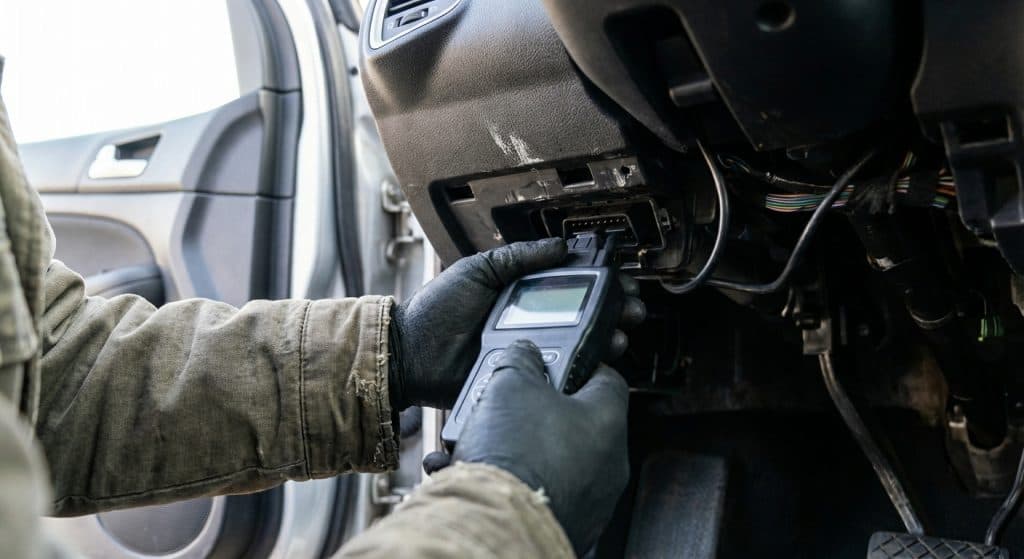
You’re looking at a used car, the price seems right, and the seller swears it runs perfectly. But you can’t see inside that engine. An OBD2 scanner can, and knowing how to use one could save you from a very expensive mistake.
This guide covers everything: what OBD2 actually is, how the system works under the hood, how to use an OBD2 scanner yourself, and what to do with the data you get. Whether you’ve never plugged one in before or you just want to understand what you’re reading, you’re in the right place.
What Is OBD2?
OBD2 stands for On-Board Diagnostics, second generation. It’s a standardized system built into your car that constantly monitors engine performance, emissions, and dozens of other vehicle functions. When something goes wrong, the OBD2 system logs it and, in many cases, triggers that dreaded check engine light.
Every OBD2-compliant vehicle uses the same diagnostic port, the same communication protocols, and the same basic code structure. That means a scanner you buy today works on a 2003 Ford as well as a 2022 Toyota. The standardization is the whole point.
Think of OBD2 as your car’s self-reporting system. It doesn’t fix problems, but it tells you exactly what the car thinks is wrong. That information is invaluable when you’re buying used.
Does My Car Support OBD2?
In the United States, OBD2 has been mandatory on all gasoline passenger cars and light trucks since 1996. Diesel vehicles came under the requirement later, typically from 2008 onward for light-duty trucks in the US. In Europe, OBD2 (referred to there under EU OBD standards) became required for gasoline cars in 2001 and diesel cars in 2004.
If your car was built after 1996 and sold in North America, it supports OBD2. Full stop. Even older vehicles from the mid-1990s often have partial OBD2 support, though compliance wasn’t guaranteed until the 1996 mandate kicked in.
The easiest confirmation is to look under the dashboard on the driver’s side. If you see a 16-pin trapezoid-shaped port, you’ve got OBD2. That connector is standardized by the SAE J1962 specification and physically identical across every compliant vehicle.
A Quick History of OBD
The original OBD system appeared in the 1980s, pushed by California emissions regulations. Early versions were basic and not standardized, so every manufacturer did things differently. A scanner that read a GM car might be useless on a Ford.
The California Air Resources Board (CARB) drove the push for OBD2 in the early 1990s, requiring much stricter monitoring and full standardization. The EPA adopted it federally for the 1996 model year. From that point forward, every light-duty vehicle sold in the US had to speak the same diagnostic language.
That shift was enormous for consumers. For the first time, a single scanner could read any car on the road. The automotive repair industry changed permanently, and eventually, affordable consumer-level OBD2 scanners became widely available.
The OBD2 Connector: SAE J1962
The physical OBD2 connector is defined by the SAE J1962 standard. It’s a 16-pin female port, usually located under the dashboard near the steering column. You don’t need to dig around for it long. Manufacturers are required to place it within easy reach of the driver.
The connector carries power, ground, and communication lines. Pin 16 provides 12V battery power, which means your scanner gets power directly from the port. No batteries needed. When you plug in an OBD2 scanner, it draws power from the vehicle immediately.
Different pins carry different communication protocols depending on the vehicle’s age and manufacturer. That brings us to how the data actually moves.
OBD2 and CAN Bus: ISO 15765-4
Modern vehicles communicate internally using a system called the CAN bus (Controller Area Network). Under the OBD2 standard ISO 15765-4, CAN has been the required communication protocol for all US vehicles since 2008. Most manufacturers adopted it even earlier.
CAN bus lets dozens of modules inside your car, the engine control unit, transmission control unit, ABS module, and more, all talk to each other over a shared network. Your OBD2 scanner essentially plugs into that conversation and listens.
Older OBD2 vehicles used different protocols like ISO 9141-2 or SAE J1850. Modern scanners handle all of them, but if you’re buying a very old scanner for an older car, it’s worth confirming compatibility.
OBD2 Standards: The Alphabet Soup Explained
OBD2 isn’t one standard, it’s a family of them. Here’s what the main ones actually mean:
- SAE J1979 / ISO 15031-5: Defines the OBD2 diagnostic message format, including what parameters can be requested and how the vehicle responds.
- ISO 15765-4: Specifies using CAN bus as the transport layer for OBD2 communications.
- ISO 15765-2 (ISO-TP): Handles how larger OBD2 messages get broken up and transported across the CAN network.
- SAE J1962: Defines the physical OBD2 connector itself.
You don’t need to memorize these to use an OBD2 scanner. But understanding that these standards exist helps explain why OBD2 works the same way across brands and models. The standards are the reason your $30 scanner can read a BMW.
How OBD2 Messages Work: SAE J1979 and ISO 15765-2
When you plug in an OBD2 scanner and request data, here’s what’s actually happening. Your scanner sends a request message to the vehicle’s ECU. The ECU responds with the data. That exchange follows a specific format defined by SAE J1979 (now updated as ISO 15031-5).
Requests are organized by service modes, sometimes called OBD2 modes. There are ten defined modes in the standard. Mode 01 returns real-time sensor data like engine RPM or coolant temperature. Mode 03 returns stored fault codes. Mode 04 clears fault codes. Each mode serves a specific diagnostic purpose.
When data is too large to fit in a single CAN frame, ISO 15765-2 (called ISO-TP) handles the job. It breaks the message into multiple frames, numbers them, and reassembles them on the receiving end. This is relevant when you’re pulling detailed data like Vehicle Identification Numbers or full freeze frame records. Most basic diagnostics fit in a single frame, so ISO-TP works invisibly in the background.
OBD2 PIDs: What You’re Actually Reading
Within each service mode, specific data points are called PIDs (Parameter IDs). Each PID has a code number and returns a specific piece of information. PID 0x0C is engine RPM. PID 0x0D is vehicle speed. PID 0x05 is coolant temperature.
Not every vehicle supports every PID. The OBD2 standard includes a special PID, 0x00, that returns a list of which PIDs the vehicle actually supports. A good scanner checks this first before requesting data.
When you’re using an OBD2 scanner and you see live data streaming across the screen, those are PIDs being read in real time. The scanner is sending requests every fraction of a second and displaying the responses as they come back.
Understanding DTCs: The Fault Code System
The most common reason people use an OBD2 scanner is to read DTCs, or Diagnostic Trouble Codes. A DTC is a standardized code the vehicle stores when the OBD2 system detects a problem. The check engine light is usually the first sign that one or more DTCs are waiting for you.
Every diagnostic trouble code follows the same format: one letter followed by four digits. The letter tells you the system involved.
- P = Powertrain (engine, transmission)
- B = Body
- C = Chassis
- U = Network and communication
The first digit after the letter tells you whether it’s a standardized code (0) or a manufacturer-specific code (1, 2, or 3). Standardized DTCs mean the same thing across every vehicle. Manufacturer-specific ones require more research or a brand-specific scanner to decode.
DTCs come in two types: stored codes and pending codes. Stored codes triggered the check engine light. Pending codes are faults the system has detected but hasn’t confirmed enough times yet to trigger the light. When you’re looking at a used car, pending codes can be just as telling as stored ones.
How to Use an OBD2 Scanner: Step by Step
Using an OBD2 scanner isn’t complicated. Here’s how to do it properly.
First, locate the OBD2 port. It’s under the dashboard on the driver’s side, usually within reach without bending down too far. Plug the scanner’s connector into the port firmly until it clicks.
Turn the ignition to the “on” position without starting the engine. This is sometimes called “key on, engine off” or KOEO. The scanner will power up from the port. Some scanners prefer you start the engine for live data, but for reading fault codes, KOEO is usually enough.
Select “Read Codes” or the equivalent option on your scanner. It will query the vehicle and return any stored or pending DTCs. Write them down or take a photo of the screen. Then look them up. Sites like repairpal.com and the manufacturer’s service documentation can help you understand what each code means.
If you want live data, select the live data or data stream option. You can watch engine RPM, coolant temp, oxygen sensor readings, fuel trim values, and more in real time. This is useful for spotting intermittent problems that don’t always trigger a stored code.
To troubleshoot a check engine light that you’ve already addressed, use the “Clear Codes” or “Erase Codes” function. This tells the OBD2 system to reset. But be aware that clearing codes also resets the readiness monitors, which takes several drive cycles to complete. A freshly cleared car will fail an emissions test if the monitors haven’t run yet.
Logging and Decoding OBD2 Data
Beyond basic code reading, you can log OBD2 data over time. This is where things get genuinely useful for diagnosing intermittent issues. Many OBD2 scanners and Bluetooth OBD2 adapters paired with phone apps (like Torque Pro or OBD Fusion) can record live data streams while you drive.
When you’re using an OBD2 logger, the device polls PIDs at a set interval and timestamps each reading. You end up with a file you can open on a computer and graph. That graph can show you exactly when a sensor value spiked or dropped, correlating it to road conditions or driving behavior.
Decoding raw OBD2 data requires knowing the formula for each PID. For example, raw engine RPM data arrives as two bytes. The formula is (256 × byte A + byte B) / 4. Every PID has a defined formula in the SAE J1979 standard. Most scanners handle this automatically, showing you the result directly. But if you’re logging raw CAN data for deeper analysis, you’ll need to apply those formulas yourself or use software like MATLAB, Python with the python-obd library, or dedicated tools like SavvyCAN.
OBD2 Multi-Frame Data: ISO-TP in Action
Here’s a real-world example of ISO-TP working behind the scenes. When a scanner requests a vehicle’s VIN using OBD2 Mode 09, PID 02, the response is 17 characters long. That’s too much for a single CAN frame, which holds a maximum of 8 bytes.
ISO-TP handles this with a “First Frame” that contains the total message length and the first chunk of data. The scanner responds with a “Flow Control” frame saying it’s ready for more. The vehicle then sends “Consecutive Frames” with the rest of the data, each numbered sequentially. The scanner reassembles them in order and presents the complete VIN.
This process happens in milliseconds. You never see it, but it’s why your scanner can pull detailed freeze frame data, emissions readiness reports, and full diagnostic histories without choking on the data volume.
OBD2 Data Logging: Real Use Cases
For everyday buyers, OBD2 data logging is useful in a few specific situations. If a car you’re considering has an intermittent rough idle that the seller says “comes and goes,” log live data during a test drive. Misfires, fuel trim abnormalities, and sensor dropouts will show up in the data even if no code is stored.
Fleet managers use OBD2 logging to track fuel efficiency, driving behavior, and engine hours across multiple vehicles. Mechanics use it to identify patterns in failing components. Enthusiasts use it to tune performance and monitor track data. The same port and the same OBD2 standards serve all of these purposes.
The Future of OBD2
OBD2 as a standard has been largely stable for decades, but the automotive industry is pushing toward new diagnostics frameworks. The WWH-OBD (World Wide Harmonized OBD) standard is an international effort to align OBD requirements globally, particularly relevant for vehicles sold across multiple markets.
Electric vehicles complicate things further. Pure EVs don’t have combustion engines, so many traditional OBD2 parameters don’t apply. Manufacturers like Tesla use proprietary diagnostics rather than standard OBD2 PIDs for battery management and motor data. However, standard OBD2 ports are still present, and some EV-specific PIDs are emerging.
The shift toward over-the-air updates and connected vehicles is also changing what on-board diagnostics means. Future systems may report diagnostic data directly to manufacturers or repair networks without a scanner ever being plugged in. But for the foreseeable future, the OBD2 port is going nowhere, and your scanner will keep working.
Choosing the Right OBD2 Scanner
Basic OBD2 scanners start around $20 to $30 and read and clear codes reliably. That’s enough for most buyers doing a pre-purchase check. Mid-range scanners in the $100 to $200 range add live data graphing, freeze frame data, and sometimes bi-directional controls that let you command vehicle systems directly. Professional-grade tools used by shops run into the thousands.
Bluetooth OBD2 adapters paired with phone apps are a popular middle ground. The adapter plugs into the OBD2 port and communicates wirelessly with your phone. Apps like Torque Pro or Car Scanner ELM OBD2 give you live data,
Was this helpful?
Put it to work. Research your next car or browse our top gear picks.